ANSWER:
A computer system is an electronic device that accepts data as input, processes it according to given instructions, stores the information, and produces useful output.
The main components of a computer system are Input Unit, CPU, Memory/Storage Unit, and Output Unit. The CPU consists mainly of the Control Unit (CU), Arithmetic Logic Unit (ALU), and Registers.
A computer works on the Input–Process–Output (IPO) cycle:
Input: Data and instructions are entered into the computer.
Process: The CPU processes the data according to the instructions.
Output: The processed information is displayed or produced as output.
Storage: Data and results can be stored for future use.
Major Applications:
Education: Online classes, learning software, and examinations.
Healthcare: Patient records, diagnosis, and medical reports.
Banking: Online banking, ATMs, and financial transactions.
Business: Accounting, billing, communication, and data management.
Conclusion: A computer system helps us process, store, and retrieve information quickly and accurately in various fields.
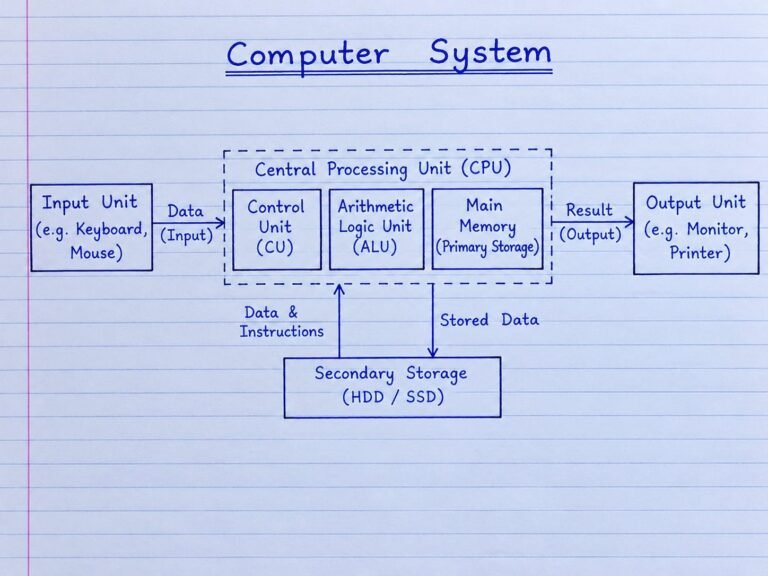
ANSWER: A computer system mainly consists of Input Unit, CPU, Memory Unit, and Output Unit..The CPU (Central Processing Unit) is c
alled the brain of the computer. It processes data and controls all the operations of the computer. The main parts of the CPU are Control Unit (CU), Arithmetic Logic Unit (ALU), and Registers.
- Control Unit (CU):
The Control Unit controls and coordinates all activities of the computer. It takes instructions from memory, understands them, and sends control signals to the ALU, registers, memory, and other parts. It works mainly through the fetch, decode, and execute cycle.
- Arithmetic Logic Unit (ALU):
The ALU performs arithmetic and logical operations. Arithmetic operations include addition, subtraction, multiplication, and division. Logical operations include comparison such as greater than, less than, and equal to.
Registers:
Registers are small and very fast storage locations inside the CPU. They temporarily hold data, instructions, and intermediate results while the CPU is working.
Internal Organization of CPU
Working: The CU fetches and decodes the instruction. It then tells the ALU and registers what to do. The ALU performs the required calculation or logical operation, while registers store the data and results temporarily. Thus, CU, ALU, and registers work together to process instructions.
ANSWER
A motherboard is the main circuit board of a computer. It connects and allows communication between different hardware components such as the CPU, RAM, storage devices, and expansion cards.
Key Components:
1 Processor Socket – Holds and connects the CPU to the motherboard.
2 RAM Slots – Used to install the computer’s main memory (RAM).
3 Chipset – Helps control communication between the CPU and other hardware.
4 BIOS Chip – Stores basic instructions needed to start and check the computer.
5 Expansion Slots – Used to add cards such as graphics, sound, or network cards
.
Importance: The motherboard is important because it provides the connection and communication path between the major components of a computer. It also supplies power and allows the CPU, memory, storage, and other devices to work together as one system.
The evolution of computers can be understood as five generations, where each generation introduced a major technology that made computers smaller, faster, cheaper, and more reliable.
Comparative Flowchart / Timeline
1st Generation → 2nd Generation → 3rd Generation → 4th Generation → 5th Generation
Vacuum Tubes
↓
Transistors
↓
Integrated Circuits (ICs)
↓
Microprocessors
↓
Artificial Intelligence (AI)
Generation
Main Technology
Size
Speed
Cost
Reliability
First (1940s–1950s)
Vacuum Tubes
Very large
Slow
Very high
Low; produced much heat
Second (1950s–1960s)
Transistors
Smaller
Faster
Lower
More reliable
Third (1960s–1970s)
Integrated Circuits
Much smaller
Much faster
Lower
High
Fourth (1970s–present)
Microprocessors
Very small
Very high
Affordable
Very high
Fifth (present & developing)
AI and advanced computing
Compact
Extremely high
Increasingly accessible
Highly advanced
Explanation
First Generation: Computers used vacuum tubes for processing. They were very large, expensive, slow, consumed a lot of electricity, and produced much heat.
Second Generation: Transistors replaced vacuum tubes. Computers became smaller, faster, cheaper, and more reliable.
Third Generation: Integrated Circuits (ICs) placed many electronic components on a small chip. This greatly reduced size and increased speed and reliability.
Fourth Generation: Microprocessors put the main processing unit on a single chip. This led to personal computers, laptops, and other small computing devices.
Fifth Generation: Computers focus on Artificial Intelligence (AI), machine learning, natural-language processing, and advanced computing. The goal is to make computers capable of performing tasks that require human-like intelligence.
Conclusion
The major technological shift was:
Vacuum Tubes → Transistors → ICs → Microprocessors → AI
With every generation, computers generally became smaller, faster, more affordable, and more reliable, while their capabilities increased greatly.
Answer:
A computer configuration means the main specifications of a computer. It mainly includes processor speed, RAM size, and storage capacity.
- Computer Configuration
– Processor Speed: It tells how fast the computer can process instructions. It is usually measured in GHz.
– RAM: RAM is the temporary memory of a computer. More RAM helps the computer run multiple programs smoothly.
– Storage Capacity: Storage is used to save files, applications, photos, videos, and other data. It is commonly measured in GB or TB.
- Types of Personal Computers
Desktop Computer:
A desktop is a computer designed to be kept on a desk. It is not easily portable and is mainly used at home, offices, schools, and workplaces.
Laptop:
A laptop is a portable computer with a screen, keyboard, battery, and other components built into one unit. It can be carried and used in different places.
Notebook:
A notebook is a small and lightweight type of laptop. It is designed mainly for easy carrying and everyday tasks such as studying, browsing, and typing.
Palmtop:
A palmtop is a very small computer that can fit in the palm of the hand. It is designed for basic computing tasks and high portability.
Difference Between Desktop and Laptop
DESKTOP COMPUTER LAPTOP COMPUTER
┌───────────────┐ ┌───────────────┐
│ MONITOR │
A supercomputer is a very powerful computer designed to perform extremely large and complex calculations at very high speed. Its performance is usually measured in FLOPS (Floating Point Operations Per Second).
Key Characteristics:
1 Very high processing speed – Performs billions or trillions of calculations per second.
2 Massive parallel processing – Uses thousands or millions of processing cores working together.
3 Large memory and storage – Handles huge amounts of data.
4 High accuracy – Performs complex scientific calculations with great precision.
5 High cost – Requires expensive hardware, electricity, cooling, and maintenance.
Applications:
.Weather forecasting: Predicts weather, storms, and climate patterns.
.Weather forecasting: Predicts weather, storms, and climate patterns.
Space research: Used for studying galaxies, planets, spacecraft, and space missions.
Nuclear simulation: Models nuclear reactions and safety conditions.
Scientific research: Performs complex mathematical and scientific simulations.
Medical research: Helps in drug discovery and biological simulations.
Engineering: Used for aircraft, automobile, and structural simulations.
Conclusion:
Supercomputers provide extremely high computational power by using massive parallel processing. They are mainly and complexity of calculations.
Difference between Primary Memory and Secondary Memory
Primary Memory:
Primary memory is the main memory of a computer. It is directly accessed by the CPU. It stores the data and instructions that are currently being used. RAM is volatile, while ROM is non-volatile. Primary memory is fast but has limited capacity.
Secondary Memory:
Secondary memory is used to store data and programs for a long time. It is not directly accessed by the CPU. It is non-volatile, so data remains saved even when the computer is switched off. Examples are HDD, SSD, pen drive, and memory card.
Working Principle
Primary Memory: CPU sends data/instructions to primary memory → memory stores them temporarily → CPU reads and processes them.
Secondary Memory: Data is stored permanently → when needed, it is transferred to primary memory → CPU processes it.
In short: Primary memory is faster and directly used by the CPU, while secondary memory is slower, larger, and used for permge.
RAM (Random Access Memory):
RAM is a temporary memory.
It is volatile, so data is lost when power is off.
It can read and write data.
It is faster than ROM.
It is used to store programs and data currently being used.
ROM (Read Only Memory):
ROM is a permanent memory.
It is non-volatile, so data remains even when power is off.
It is mainly used for reading stored data.
It is slower than RAM.
It stores important fixed instructions such as boot instructions.
PROM
PROM stands for Programmable Read Only Memory.
It is blank when manufactured.
Data can be programmed only once.
After programming, the data remains permanently.
It is used where fixed data is required.
EPROM
EPROM stands for Erasable Programmable Read Only Memory.
It can be programmed and erased multiple times.
Data is erased using ultraviolet (UV) light.
After erasing, new data can be programmed.
It is useful for testing and development.
Simple Difference Table
RAM Temporary memorY
Volatile
Read and write
Faster
SLOWER
Data is lost when power is off
ROM
Permanent memory
Non-volatile
Mainly read only
Slower
Data remains after power is off
Data remains after power is off
Diagram: Draw a simple RAM chip with Address Lines, Data Lines and Control Lines, and a ROM/EPROM chip with Address Lines and Data Output.
Hard Disk Drive (HDD)
A Hard Disk Drive (HDD) is a magnetic storage device used to store large amounts of data permanently. It contains rotating platters, a spindle, and a Read/Write head. Data is stored magnetically on the platters.
- Zip Drive
A Zip Drive is an older removable magnetic storage device. It uses special Zip disks to store data. It was used for transferring and backing up files before USB flash drives became common.
- Flash Drive (Pen Drive)
A Flash Drive is a small portable storage device that uses flash memory to store data. It has no moving parts, so it is faster, quieter, and more resistant to physical movement than an HDD.
In short: HDD and Zip Drives use magnetic storage, while Pen Drives use flash memory. Flash drives have no moving parts and are highly portable, whereas HDDs generally provide
Answer:
A Solid-State Drive (SSD) is a storage device that uses flash memory to store data. It does not have any moving mechanical parts like a traditional Hard Disk Drive (HDD).
Working of SSD:
An SSD stores data in NAND flash memory cells. A controller manages the reading, writing, and storage of data. Since data is accessed electronically, an SSD can read and write data much faster than an HDD.
HDD and SSD Comparison
HDD
SSD
Uses spinning magnetic disks
Uses flash memory chips
Has moving parts
Has no moving parts
Slower data access
Faster data access
Takes more time to boot
Boots very quickly
Consumes more power
Consumes less power
Less resistant to shock
More resistant to shock
Produces some noise
Completely silent
Advantages of SSD
Faster speed – Provides quick data transfer and application loading.
Fast boot time – The computer starts quickly.
No moving parts – Makes it more reliable and silent.
Shock resistant – Less affected by physical movement or vibration.
Lower power consumption – Saves battery power in laptops.
Less heat generation – Produces less heat during operation.
Conclusion: An SSD is generally faster, quieter, more power-efficient, and more shock-resistant than a traditional HDD.